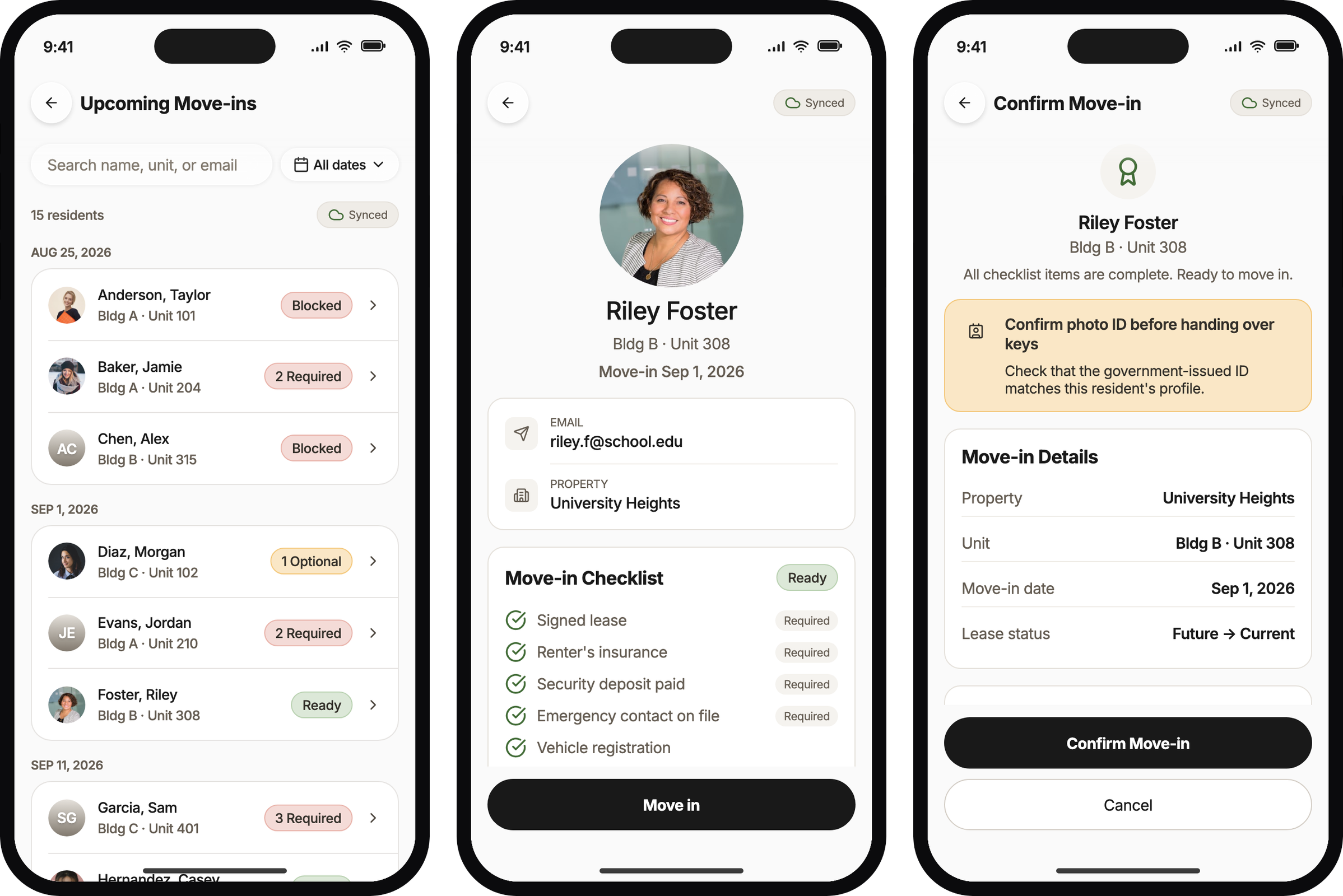
On move-in day at a student property, hundreds of residents walk away with keys while Entrata still says they never moved in. I designed the phone flow that records the move-in while the resident is still standing at the table, even when the Wi-Fi is gone.
Peak student turn moves 100 to more than 500 residents in a day, from a breezeway, the office, or a drive-through. The Wi-Fi is unreliable, and the line does not stop for it.
So staff marked a spreadsheet and caught Entrata up later, or fought desktop Entrata on a phone. Either way, the resident felt moved in and the system of record did not.
An audit of May through August 2025 at a large student operator put numbers on that gap.
~21%
Student move-ins processed in Entrata in real time on move-in day
~36%
Move-ins with zero Entrata activity in the window, then caught up overnight
~0%
Peak-month use of desktop Bulk Move-In at the largest operator in the set
Why that gap matters to Entrata
Student housing was a majority of Entrata’s clients, and move-in week is their busiest week of the year. If that week runs on a spreadsheet, Entrata is optional on the days that matter most, for the customers who make up most of the book.
A phone in the line writes the record while the resident is still there. That was the bet: a property that can move someone in offline, in seconds, has a reason to run the day in Entrata.
Process
The first answer was an overnight upload
The pain we could measure first was the morning after. A 300-resident property spent about eight hours re-keying a spreadsheet into Entrata. So I designed an agent that matched each row to a lease and showed its work before writing anything.
Site visits moved the bet. The failure happened while the resident was still in line, and a faster catch-up still left Entrata wrong all day. The upload stayed as the next-morning bridge, and the main bet moved to the table.
Before anything was written, the upload sorted the file into people who would move in, people who needed a follow-up, and rows it would skip.
Wrong first. Then the table told us.
My first spec assumed a QR scan would lead, open optional items would block the move-in, and offline could wait for a later release. Site visits at three properties and interviews with about 20 operators corrected all three.
Operators described the line as “Smith, 315,” not a code on a phone. Optional items could not hold up a couple hundred people outside. Breezeway Wi-Fi fails often enough that offline had to ship first. I rewrote the requirements within 48 hours.
What I tried first
What replaced it, and why
Name-only search
A unit search returns every roommate, because staff move roommates in back to back.
Offline in a later release
Offline in the first release, with the next 30 days of move-ins cached on the device.
A large offline banner
A quiet Offline chip. The banner looked safe in mocks and would have been ignored outdoors.
A manager PIN override
No override in the first release. It would be too easy to burn on a busy Saturday.
Search replaced the camera
The first SwiftUI build opened on a QR scanner, and search was the button at the bottom. Operators described the line as a name and a unit, so I made the roster the first screen and moved the scanner to an icon in the header.
In the first build, staff landed on a camera and had to tap out of it to search.The roster and its search field became the first screen, with QR as a secondary icon.
Making Ready the loudest badge
In the first roster, Ready was gray and every open required item was red, so the people who could not move in were the ones that caught the eye. The express line needs the opposite. I made Ready green and turned every other state neutral.
Before, the red blockers were the loudest thing on the list.After, a glance down the list finds the residents who are ready to go.
The success message after confirm
I tried three versions of the moment after confirm. A custom toast let staff start the next student right away. A system alert was more familiar, but it made staff tap OK before anything else, and that stops a line. The toast came back, and it now dismisses itself.
The first toast confirmed the move-in without blocking the roster.The system alert made staff tap OK before they could search again.The final toast returns on the later roster and disappears on its own.
The optional-items warning
Once optional items stopped blocking the move-in, the screen still treated them like a problem. An orange warning sat at the top, and the escalation task competed with Move in on the same row. The warning became a calm note, and the follow-up became a second action under Move in, as shown in Solution.
The orange warning and the side-by-side buttons made a resident who could move in look like an exception.
An offline chip on the roster
The cached roster already worked without a network, but nothing on screen said so. Staff could not tell whether a confirm had reached Entrata or was waiting on the device. I added a small chip that says Offline and how many confirms are queued.
Before, the offline roster looked exactly like the online one.After, the chip says the device is offline and two confirms are waiting.
Solution
Name, checklist, confirm, next
The flow follows the line staff already ran. They type the name they just heard, glance at the checklist, check a photo ID, and confirm. What used to take minutes in desktop Entrata, or overtime the next day, now takes seconds.
The Ready badge is not a new policy. Operators already ran an express line for ready residents and a cleanup line for everyone else, and the roster puts that rule on a screen.
The roster shows who is ready before staff open anyone.A ready resident gets a checklist glance, not a profile review.Confirm puts the photo ID check above the button.
Keep the line moving, and still stop when you must
Optional items that were still open at confirm used to disappear once the person was moved in. Now staff can move the resident in and leave themselves a follow-up task, so someone comes back to those items after the rush.
Required items and hard blocks stop the line, with no override. Staff send that person to the resolution station, which is how properties already handled exceptions.
Optional items are open, and Move in is still available.Required items are open, so Move in is gone.
Offline is the day, not a later cut
Staff are on company iPads in a breezeway, and the Wi-Fi drops. The next 30 days of move-ins are cached before they walk outside. When the network goes, home collapses to Move-In, the roster still searches, and confirms wait for a connection.
Offline, home shows a short note and Move-In, and nothing else.A small Offline chip tells staff the writes are waiting.
What the mobile team received
I worked out the states in an Expo prototype, then rebuilt the flow as a SwiftUI package with a demo target the OXP mobile team could drop into their app. Their review found five real defects in about half an hour, and the fixes went back the same day.
The rewrite cost time. It also meant the native team reviewed a module they could run, not a stack of frames.
What's next
How we would know it worked
Pilot results are not in yet, so these are the targets that would prove the bet or disprove it. If same-day completion stays near one in five, the spreadsheet won.
Signal
What we already knew
Target
Same-day completion at pilot properties
About 21% processed in Entrata on the day
95% or more
Move-ins caught up the next morning
About 36%
Near zero
Staff overtime during turn
About 8 hours of re-key on a 300-resident property
Down 60%
Time to process someone at the table
About 90 seconds, anecdotal
Under 20 seconds
Share of pilot move-ins done on the device
About 0% peak-month use of desktop Bulk Move-In
30% or more
Wrong-resident incidents
A known risk when roommates share a unit
Zero
What I would change
I would put offline in the first release from week one, instead of waiting for interviews to force it.
I would bring the engineering partner in by the end of week one. Week three was too late to learn the live app’s constraints.
I would move to SwiftUI sooner. Expo was right for arguing about states and wrong for a native team’s final review.
Student housing was a majority of Entrata’s clients, and move-in day is when that segment either uses the system of record or replaces it with a spreadsheet. A hundred to five hundred people show up at a breezeway, the office, or a drive-through. Staff hand over keys, and the resident walks away finished, while Entrata often still has no record of the move-in. I designed a search-first mobile flow for that line, including when Wi-Fi is down, and handed Entrata’s OXP mobile team a native iOS module they could drop into the staff app they already ship.
CollaboratorsCustomer Workflows engineering, the OXP mobile team, about 20 student-housing operators from industry interviews, and Entrata’s data team
SurfaceA SwiftUI module inside Entrata’s OXP staff iOS app, shipped as a package with a demo target
These three screens are the table path: the roster of people due to move in, a resident who is ready, and the confirm step. They come from the Expo prototype we used to argue the flow before we rewrote it in SwiftUI for the native iOS team.
Problem
Entrata still listed them as not moved in
Peak student turn is a full-day operation. Properties move in anywhere from about 100 to more than 500 residents, and staff set up in a breezeway, pull people through the office, or run a drive-through that stuck around after COVID because it kept the line moving. Wi-Fi is unreliable where they stand. The next few days are hectic too, because most of the work in Entrata still has not happened.
Two workarounds showed up over and over. When they stayed offline, staff found the student on a spreadsheet, marked them moved in, handed over keys and a packet, and had almost no live view of the move-in checklist — the list of required and optional items that says whether someone is actually prepared. When they tried to stay online, they opened Entrata on a laptop, an iPad, or a phone. The web product is not built for that surface. It asks them to review a full profile, extra steps that student turn does not have time for, because readiness was supposed to be handled in advance.
By the time someone is in line, staff should be able to see ready or not ready at a glance, then either move them in or send them to a different line. The old table did not give them that. Residents felt moved in. Entrata did not.
A May through August 2025 audit at a large student operator made the scale visible. Only about one in five student move-ins hit Entrata in real time on the day. About a third had zero activity in the window and got caught up overnight. Bulk Move-In, the existing desktop tool for processing many residents at once, barely showed up in peak months. More training on desktop was not going to change a day built around staying offline until the line was gone.
~21%
Student move-ins processed in Entrata in real time on move-in day
~36%
Move-ins with zero Entrata activity in the window, then caught up overnight
~0%
Peak-month use of desktop Bulk Move-In at the largest operator in the set
Why move-in week matters to the business
Student properties made up a majority of Entrata’s clients. Move-in is the week that segment turns the building over. Keys go out, and the lease is supposed to become a current resident in the system the operator pays for. If that week lives on a printed roll, Entrata is optional on the highest-volume days of the year, for the customers who make up most of the book.
The advantage of a phone in the line is that the record is written while the resident is still standing there. Occupancy, billing start, and the lease status do not wait for tomorrow’s overtime. A property that can move someone in offline, in seconds, has a reason to run the day in Entrata. A property that catches up the next morning has a reason to keep the spreadsheet. The bet was that the first outcome would replace the second.
If same-day writes stay near the one-in-five baseline, or if peak months still look like unused Bulk Move-In, the segment did not switch and the bet is wrong. The targets at the end say what would prove it. They are not pilot results.
Process
The first answer was an overnight upload
The pain we could measure first was the morning after. Staff had already marked people moved in on a spreadsheet. Then they sat down and typed every name into Entrata. For a 300-resident property that was about eight hours of overtime in the busiest week of the year. So I designed an agent that would take that file, match each row to a lease, and show the work before anything was written.
The walkable prototype treats the spreadsheet as the source of truth. It does not ask staff to map columns by hand. What they have to check is the match. Rows land in three buckets: people who will be moved in, people who will be moved in with a follow-up task, and rows the agent will skip unless a person steps in. When two residents share a name, staff pick the lease. Confidence sits on that choice, not on a mapping grid.
Site visits and operator interviews moved the bet. The failure was happening while the resident was still in line. A faster catch-up still left Entrata wrong during the day. We shifted the focus to this table app. The upload stayed for teams that keep the paper or the spreadsheet and process it the next morning. Treating both as one program would have stalled the line. Splitting them meant neither had to wait.
Workstream
What it is for
Bulk Move-in Smart Upload
The first answer, and the next-day bridge: turn a spreadsheet into Entrata records.
Homebody Move-In Readiness
Help the resident get ready, including a QR code they can show.
OXP Move-In Day Execution
Staff at the table. This case.
Resident Readiness AI
Nudges before turn. Thinner artifacts, not this product.
Nothing is written yet. The agent has already sorted the file. Staff can see who will move in, who needs a follow-up, and which rows it will skip.A missing checklist item does not block the move-in. The agent will still process the resident and create a follow-up for pet screening or vehicle registration.J. Smith in A-102 could be James or Jennifer. Both matches are high confidence. Staff pick the lease, skip the row, or turn it into a follow-up before anything commits.
What the visits and interviews changed
The first spec assumed a QR code would lead — staff would scan a code on the resident’s phone — and that optional checklist items could wait for a later pass. Site visits at three properties pointed somewhere else: printed rolls, laptop sheets, and physical packets. At one site, roughly one in three residents hit a resell or exception path we had not modeled.
Notes from an industry interview with about 20 operators forced the bigger resets. Search had to come before QR. Optional items should not block the line; they become an internal follow-up. Offline belongs in the first release, not a later milestone. I rewrote the product requirements within 48 hours of that feedback.
SQL work across ten queries sized how unused Bulk Move-In really was, and looked at whether checklist completion went with renewals. That second link stayed directional. I would not treat it as proof that a complete checklist causes someone to renew.
What we looked at
What it changed
Site visits at three properties
A nicer Entrata screen alone would not win the table. The spreadsheet was the working product, and we had undercounted how often someone hit an exception.
Discovery write-up
Bulk tooling can hide residents who are not actually ready. Future to Current — flipping a lease from an upcoming status to a current one — is a staff judgment call, not a silent status change.
Industry interviews with about 20 operators
Search first. Optional items become a follow-up instead of blocking the line. Offline in the first release. I rewrote the requirements in two days.
Ten SQL queries on production data
We could finally put a size on unused Bulk Move-In. The link between checklist completion and renewals stayed directional, not causal.
Operators already ran an express line and a cleanup line by hand. Ready residents grab keys and go; everyone else gets routed. The Ready badge on the roster is that existing rule on a screen, not a new policy we invented.
Solution
Move-In on the home screen
Move-In sits on Command Center as a Quick Action, on the same home screen staff already open in the field. We talked about burying it under lease admin so it would match the desktop information architecture. That would have failed the breezeway job, so we kept it on the home surface.
Staff start from the same home screen they already use for packages and work orders. Move-In is a Quick Action, not a buried lease-admin screen.
Search, readiness, and confirm
The path is meant to match how the line already runs. Staff open upcoming move-ins, type a name, and open the resident. The checklist shows required versus optional, and complete versus still open. If the required items are done, they can move the person in. They confirm a photo ID, glance at a few move-in details, and tap confirm. A short success message appears, then the roster is ready for the next student.
That used to take several minutes in desktop Entrata, or it did not happen until overtime. Here it is seconds. Student turn does not need a full profile review at the table. Preparedness already lives on the checklist. Ready or not ready is the decision.
QR is still a secondary path for later, once resident-side readiness is live. Operators described the line as “Smith, 315,” not “hold still for the camera.” The screens below are from the Expo prototype. We later rebuilt the same paths in SwiftUI for the native team.
The roster of upcoming move-ins is cached for the next 30 days, so it is already on the device when staff walk outside.Staff type the name they just heard. Search is the primary control, not a camera scan.Required versus optional is visible on the checklist. If required work is done, Move in is available, and Ready is the express-line signal.
The confirm step
Confirm is short on purpose. Staff check that the government ID matches, glance at the property, unit, date, and whether the lease should flip from Future to Current, then tap confirm. A success message lands on the roster so the next student can start immediately.
Photo ID sits above the button. Move-in details stay short — property, unit, date, and Future to Current — then confirm.A short confirmation appears, then the roster is ready for the next person in line.
Try it in the prototype
This is the Expo prototype we used before rewriting the flow in SwiftUI. Open Move-In from Quick Actions, search a name, then walk a Ready resident through confirm. Optional items still let you move in. Required items stop the line.
Start on Home, open Move-In from Quick Actions, search Foster, and confirm Riley Foster, then toggle Network to Offline in the settings beside the phone to see home collapse to Move-In.
Student units are beds, not single apartments. Searching “204” has to return everyone on that unit, not one name and a dead end.
We almost shipped name-only search first. Operator feedback shut that down. Staff process roommates back to back, and retyping between beds is where wrong-unit mistakes happen.
A search for “204” returns two residents on the same unit, each with their own readiness state, so staff can process roommates back to back.
Optional items become a follow-up task
The first draft treated incomplete checklist items as blockers. Industry interviews pushed back hard. Optional follow-ups cannot hold the line when a couple hundred people are outside.
If required items are done and a couple of optional items are still open, staff can still move the resident in. They can also create an escalation — a task on their own list — so someone comes back to those items after the rush. There is no text to the resident and no assignment in the resident portal. The line keeps moving.
Before this, optional items that were still open at confirm went into a void. Once the person was moved in, there was no reliable way to know whether those non-required items ever got done. The task is the tracking system that was missing, not extra policy on move-in day.
Required work is complete and optional work is not. Move in stays available. Staff can create an escalation if they want a reminder after the rush.Confirm can also create an escalation. That is an internal task for staff, not a to-do sent to the resident.
Required items stop the line
Required items are different. There is no override in the first release. Staff send the resident to a resolution station, or tell them to come back when the item is done, which matches how operators already route exceptions when one person on site can clear them.
Hard blockers such as a unit that is not ready or a balance due use the same stop. We debated a manager PIN override and left it out. It would be too easy to burn on a busy Saturday, and interviews said properties already have a permissioned person for that job offline.
Required items are still open, so Move in is unavailable. Staff pull that person off the express line.A hard Blocked state lists the validation errors. The table path ends here until someone who can clear them takes over.
Offline in the first release
I originally had offline on a later cut. Industry interviews corrected that: breezeway Wi-Fi fails often, and staff are on company iPads, not personal phones. The roster for the next 30 days of move-ins is cached on the device before they walk outside.
When the network is down, Command Center drops to Move-In and a short offline note. Everything else can wait. The roster still searches. Confirms still queue. A small Offline chip stays visible so nobody wonders whether they are writing to Entrata live or to the cache.
When the device is offline, home shows a short message and Move-In. The rest of Command Center is not the job at the table.The same roster stays searchable against the cache. An Offline chip makes the state obvious without blocking the work.Checklist review and confirm still work while offline. The writes wait for a network.
The choices that held
What we chose
Why, and what we dropped
Search first, QR second
The line sounds like a name plus a unit. A QR scan waits until resident-side readiness is actually in use.
A unit search returns everyone on the unit
Staff process roommates back to back. Name-only search was the tempting shortcut and the source of wrong-unit mistakes.
Required versus optional on the roster, summary, and confirm
If only the confirm screen knew the difference, the roster would lie about who was actually ready.
An escalation task instead of a void
Optional leftovers used to disappear after move-in. The task is how staff come back to them.
Offline in the first release, with a 30-day cache and a quiet chip
A large offline banner looked safer in mocks and would have been ignored outdoors.
Ready reads louder than blockers
The express line needs the green path to win a glance. An error-first screen slowed the people we wanted to move fastest.
Skip the full profile at the table
Desktop Entrata asked for a review that student turn does not have time for. The checklist is the readiness signal.
What the mobile team received
Flow work started in Expo against the OXP design system so we could change states quickly. Expo is a way to prototype on a phone without writing native iOS first. Final handoff was a SwiftUI package plus a demo target for the in-house OXP mobile team to drop into the live app.
That order cost us a rewrite, but it meant the mobile team could walk every path in a runnable module. Their review found five real defects in about half an hour: alert copy, the count pill, the property filter, and the cache and sync indicators. They made small changes to fit the app, and the fixes went back the same day.
Escalation rules are written down: optional items allow move-in and can create a follow-up task; required items block and redirect.
Offline behavior is specified: a 30-day cached roster, queued writes, home collapsed to Move-In, and a status chip instead of a blocking modal.
We left out of the first release on purpose: nudges to the resident about optional items, expired-QR demos, and a manager PIN override.
What's next
How we would know it worked
What we left behind was a scoped table-side flow with offline and follow-up rules the OXP mobile team could implement. It is not a shrunk desktop Bulk Move-In screen, and it is not the overnight upload wearing phone chrome. Pilot actuals are not in yet.
The hypothesis was that a search-first phone in the line would make Entrata the record while keys went out, for the student segment that is most of the book. Each row is a way that could fail. If same-day completion stays near 21%, the spreadsheet won. If the device share stays near zero, student properties did not switch. If overtime does not fall, the customer has no reason to drop the re-key.
Signal
What we already knew
Target that would prove the bet
Same-day completion at pilot properties
About 21% processed in Entrata on the day
95%+. Staying near 21% disproves it.
Move-ins with no Entrata activity until the next morning
About 36% caught up overnight
Near zero. A large overnight pile means the line still bypassed Entrata.
Staff overtime during turn
About 8 hours of re-key on a 300-resident property
Down 60%. If the morning shift stays, the customer case fails.
Time from the next person in line to the correct record
Not measured; the line was a name shouted across a table
Under 10 seconds.
Time to process someone at the table
About 90 seconds, anecdotal
Under 20 seconds.
Share of pilot move-ins done on the device
About 0% peak-month use of desktop Bulk Move-In
30%+. Another unused tool disproves the segment bet.
Wrong-resident incidents
A known risk when roommates share a unit
Zero.
What I would change
I would put offline in the first release from week one. Waiting until industry interviews forced it wasted sequencing time.
I would bring the delivery engineering partner in by the end of week one. Week three was too late to learn the constraints of the live app shell.
I would bias to SwiftUI earlier for an iOS mobile-team audience. Expo was useful for arguing about states, but it was the wrong artifact to hand a native team for final review.