
Desktop · Systems
Entrata Pricing Specials
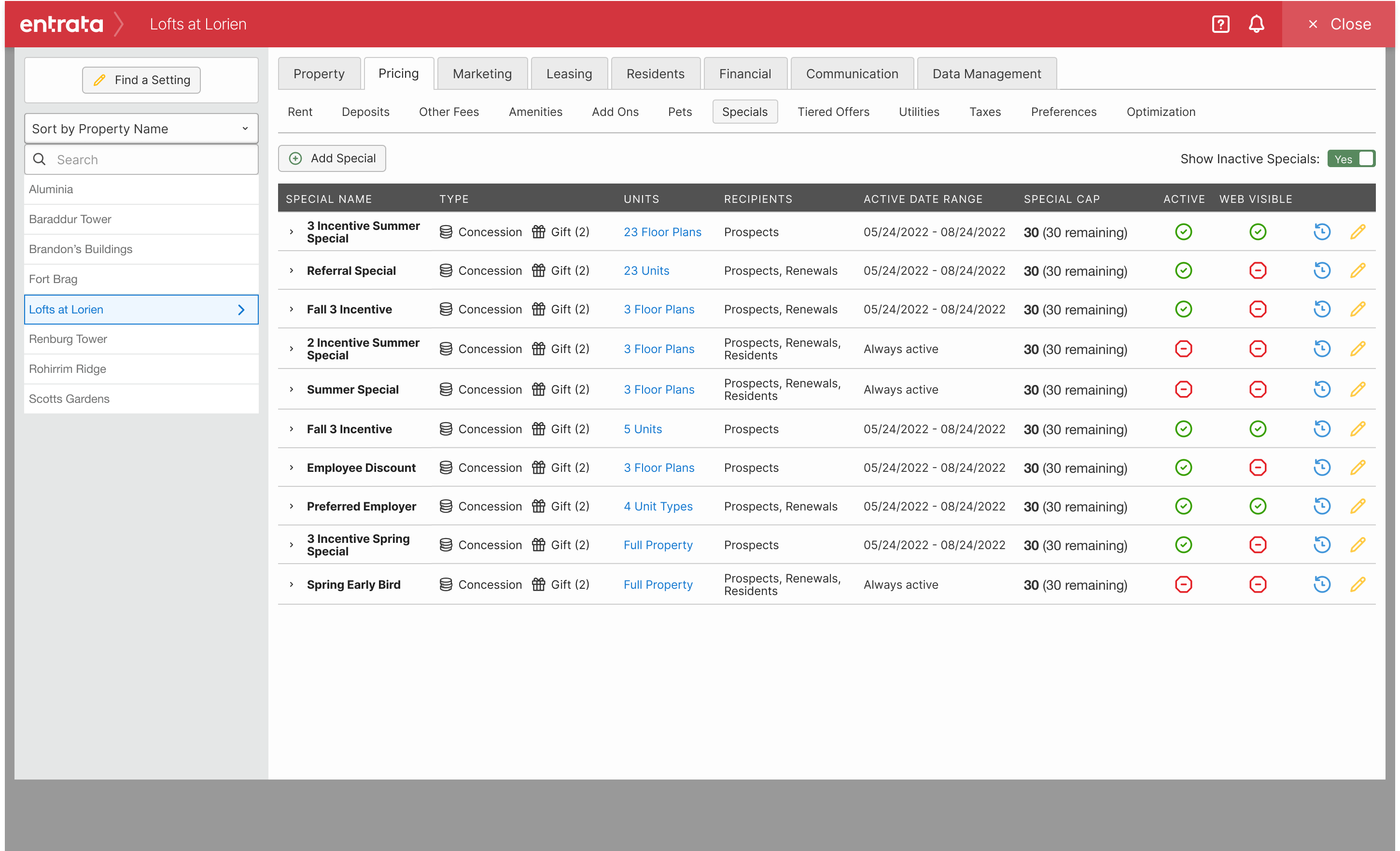
In Entrata Pricing, a special could carry one incentive — a gift or a credit. Two offers meant two specials, and the resident path got weird. I was the first designer on a rewrite of staff setup: property managers and regional admins needed one special that could hold a list of incentives, targeted by lease term, move-in date, space, applicant type, and whether it was for prospects, renewals, or both. I spent a few months in 2022 cutting the create flow until critique put some of it back, then usability testing pulled us toward the Pricing setup pattern people already knew instead of a sleeker one-off. Other teams built accept and prospect-portal display on that model. Engineering spent the next year shipping and repairing. After a rough first release settled, 10,204 active specials sat on 337 clients. 8,290 used lease-term rules. 162 specials on 38 clients ran the multi-select path that did not exist before.
Problem
A special could hold one incentive
In Pricing, creating a special meant choosing a single incentive type. Gift or credit. If a property wanted a resident to pick from more than one, staff made multiple specials and hoped the downstream path made sense. It did not. The setup person was confused. The resident path was worse.
The hard part was not the marketing copy. It was the grid of properties those specials had to live on. Student housing especially: lease terms, move-in windows, space options or not. Conventional properties had a different creation path. The existing screen asked staff to do all of that at once.
1
Incentive per special in the old model — gift or credit, not both
2
Property types the create flow had to cover: student and conventional
Staff
Primary user: property manager, regional, or admin setting up Pricing
Multiple specials were not a workaround for multiple incentives. They were a different product, and residents could not use them that way.
Operators who knew Yardi expected a choice
Yardi’s RentCafe could already offer this kind of choice. It uses the guest card to present a set of options during the online application, so a resident picks among incentives instead of taking a single posted offer. Entrata Pricing could not do that. A special held one incentive, a gift or a credit.
Staff were already trying to get there. Two specials was the workaround, and it confused the person setting it up and the resident who had to use it. Operators who had run the offer in Yardi asked for the same setup in Entrata, and Pricing could not do it.
That gap was a retention problem. The promotion those operators used to lease and renew lived in the product they had left. One special that could hold a list of incentives was how Entrata kept that offer, and that client, inside Pricing.
Former Yardi operators wanted a resident to choose among incentives. Until Pricing could do that, the offer was a reason to go back.
Process
Why the old Pricing screen stayed the map
I started by cutting. The philosophy was to remove so much that collaboration and critique would have to put about 20% back. That is how I knew we had actually reduced noise instead of rearranging it. A three-step wizard replaced the all-at-once create screen. Each step held less. The special itself could hold more: a list of incentives, then rules for lease terms, move-in dates, space options, applicant types, promo codes, manual-only, and whether prospects and renewals shared it.
The piece I pushed hardest to leave out was pricing per lease term and per space option. A space option is a student-housing fact: a room with two beds can be sold as private, shared, or as two rooms — and each of those can carry a different concession. I could set a $50 monthly discount, then a grid of different amounts for summer vs fall, private vs shared. About 1% of people priced at that grain. Those people sat on a significant set of clients. Pulling the grid would have broken how they already used Pricing the moment we added multi-incentive specials. I lost that argument to PM and engineering. I still think the default create path should not have been built around that 1%. I also had to design the grid well once it was in.
Usability testing is what stopped me from shipping a cleaner product that did not belong in Pricing. Testers were used to how Pricing is set up everywhere else in Entrata. The old UI looked dated. It was also the format they already trusted. A sleek, simple shell would have been a change-management project on top of a capability project. We went back toward that paradigm — quieter steps, same family as the rest of Pricing — so the new special was learnable.
The screens still look like Entrata of that era: heavy red, a design library we were not going to break for one flow. Belonging mattered more than a portfolio-friendly UI. I would still make that call. I would also still say the library was holding the product back.
| Input | What it changed |
|---|---|
| Old model: one incentive per special | Creation had to support a list on a single special, not a pile of specials. |
| Student vs conventional, space options vs not | One create process with forked steps, not four products. |
| Pricing per lease term × space option (~1% of setups, concentrated clients) | Pushed to cut it. Lost. Keeping it meant multi-incentive could not strand existing Pricing users. |
| Usability: Pricing setup is a habit | Dropped the sleek one-off. Kept the quieter steps inside the existing paradigm. |
| Design library and brand red | Shipped looking like Entrata so it would get used. Did not pretend this was a visual redesign. |
The first instinct was a nicer wizard. The useful instinct was: do not orphan specials from Pricing.
What setup had to be for other teams
I owned staff create. That was the first design on the initiative, and it became the contract. Resident accept, incentive select, and prospect-portal display were assisted and then taken by other product teams — they had to follow how setup named incentives, stacked them, and restricted them. If setup was a mess, every downstream surface would be a mess.
The targeting model is what made multi-select safe to offer. A resident can only choose from a list the property can honor: this lease term, this move-in window, this space option, this applicant type, sometimes a promo code, sometimes staff-only. Without those restrictions, a list of incentives is a promise accounting cannot keep.
I was not on the channel for the full year and a half. Design was a few months in mid-2022, with follow-ups. Release, the rough first launch, the R1 re-implementation of applicant types, Anil’s differential rebuild, and the drop in incoming bugs were engineering’s chapter. The adoption numbers are from after that chapter. I designed the setup those diagnostics count. I did not personally ship the rebuild.
| Choice | Why / what we dropped |
|---|---|
| One special, many incentives | Multiple specials could not produce a real choice for the resident. |
| Three quieter steps, not one mega-form | Staff still had to do the work. They did not have to see all of it at once. |
| Match Pricing setup, not a new visual language | Usability: entrenched users. Change management was the hidden cost of “sleek.” |
| Restrictions as part of create | Lease term, dates, space, applicant type — or the list would over-promise. |
| Cut until critique added ~20% back — then lost the grid fight | Wanted lease-term × space-option amounts as an advanced path, not the main create. PM and eng kept it. About 1% priced there; those clients already depended on it. |
| Stacked modal for lease-term rates | Textbook anti-pattern. Best option under the library and the grid we had to keep: one more surface, same create context, not a new page. |
| Look like Entrata | A prettier island would have been skipped. The library was the constraint. |
Solution
The three default steps
Details, Recipients, Incentives. Name it, say who it is for, add the list. Floor-plan and space-option pickers stay collapsed as “all” or “selected.” Toggles for date caps sit off until someone needs them. That is the default path — quieter than the old mega-form, still in Pricing’s chrome, still dummy data.
Complexity is available. It is not in your face. If they never price by space option and lease term, they never see the grid. If they do, the UI gets denser on purpose. That was the trade: still simpler than original create, honest about the 1% path we lost the fight to keep out of the default.
Lease terms and space options
This is the shape we ended up having to support. A special could be for prospects and renewals but not current residents; limited by date range and renewal start; assigned to selected properties, and then to selected floor plans, unit types, or even specific units. On that special, three incentives: two gifts with different values, and one concession. That concession could itself be a stack — a one-time $100 plus $50 a month — and those amounts could differ for a shared room versus a private room, and again for summer term versus fall. That is one special. That is why setup could not be a pretty three-field form.
When someone opens the concession, the summary becomes a row per space option: private room, private unit, shared room. Price by Lease Term then opens a second dialog on top of Add Special — Lease Terms Rates — so spring vs fall can differ without dumping that table into the already-full create modal. A lot of UX writing says never stack dialogs. It depends. Under this design library, with create already a modal, a new page would have dropped the special context. A second small modal kept the grid in the same session. I would still defend that here. I would not make it a house rule.
I assisted how a resident accepts and selects, and how specials show in the prospect portal. Those screens are supporting. Setup is the case.
If they want it complicated, it can be. The default path does not start there. We simplified the workflow. We did not simplify the domain.
What other teams inherited
I did not own the resident-profile surface. I helped. Other product teams designed this version. It is here because it is the same object: Gift (2) on one row, Concession plus Gift on another — the setup model showing up where staff actually apply a special.
If a resident called the office to pick an incentive, the person on the phone could accept it here instead of sending them through a portal. Status is active or inactive. Received is a date, or a button to mark it received. That is office-side completion of a choice that started in Pricing setup.
Results
Adoption after the rough launch
The first release was rough. I would not lead with that, and I would not hide it. After R1 2024, incoming bugs dropped sharply. Applicant types had to be re-implemented. A differential rebuild made a large difference for customers. That is the engineering story that made the setup usable in production.
The snapshot that closed the channel: 10,204 active specials across 337 clients. That is how much of the client base was relying on specials for leasing and retention — the platform, not a claim that I caused 337 logos. Inside that base, the capabilities I designed setup for actually got used.
Lease-term restrictions showed up on 8,290 specials across 278 clients. Move-in date restrictions on 1,563 specials across 155. Applicant types on 1,266 specials across 118. Shared prospect and renewal on 432 specials across 57. Multi-select — the new behavior — on 162 specials across 38 clients. That last number is small because it is a new way to lease, not a default toggle. Zero clients could do it before.
10,204
Active specials across 337 clients after the initiative (platform)
8,290
Specials using lease-term restrictions (278 clients)
1,266
Specials for specific applicant types (118 clients), after the R1 re-implementation
162
Specials with multiple incentives to choose from (38 clients) — did not exist before
I designed the setup those diagnostics measure. The 1.5-year ship, the rebuild, and the bug drop were a multi-team release. I do not claim the 337-client base as a personal conversion.
What I would change
- Instrument setup itself: time-to-create, error on publish, which branch (student / conventional / space options) actually got used. Channel diagnostics counted live specials. They did not tell us if the wizard was faster than the old mega-form.
- Keep a before screenshot in the design file on purpose. The all-at-once create screen is the argument. I am still hunting it in the recovered file.
- I would still conform to Pricing’s setup pattern. I would still have cut per-lease-term × space-option pricing from the default create path — make it advanced, not the main story. I lost that one. I would push harder, earlier, on the design library. Belonging was right. Shipping a red, dated shell as the cost of belonging was a company constraint I would not pretend was taste.
Built with — Figma (click-through prototype, dummy data); usability testing; Pricing design library constraints.